
Architecture of an autonomous startup-idea generator (Python, Pydantic AI, Gemini, Postgres)

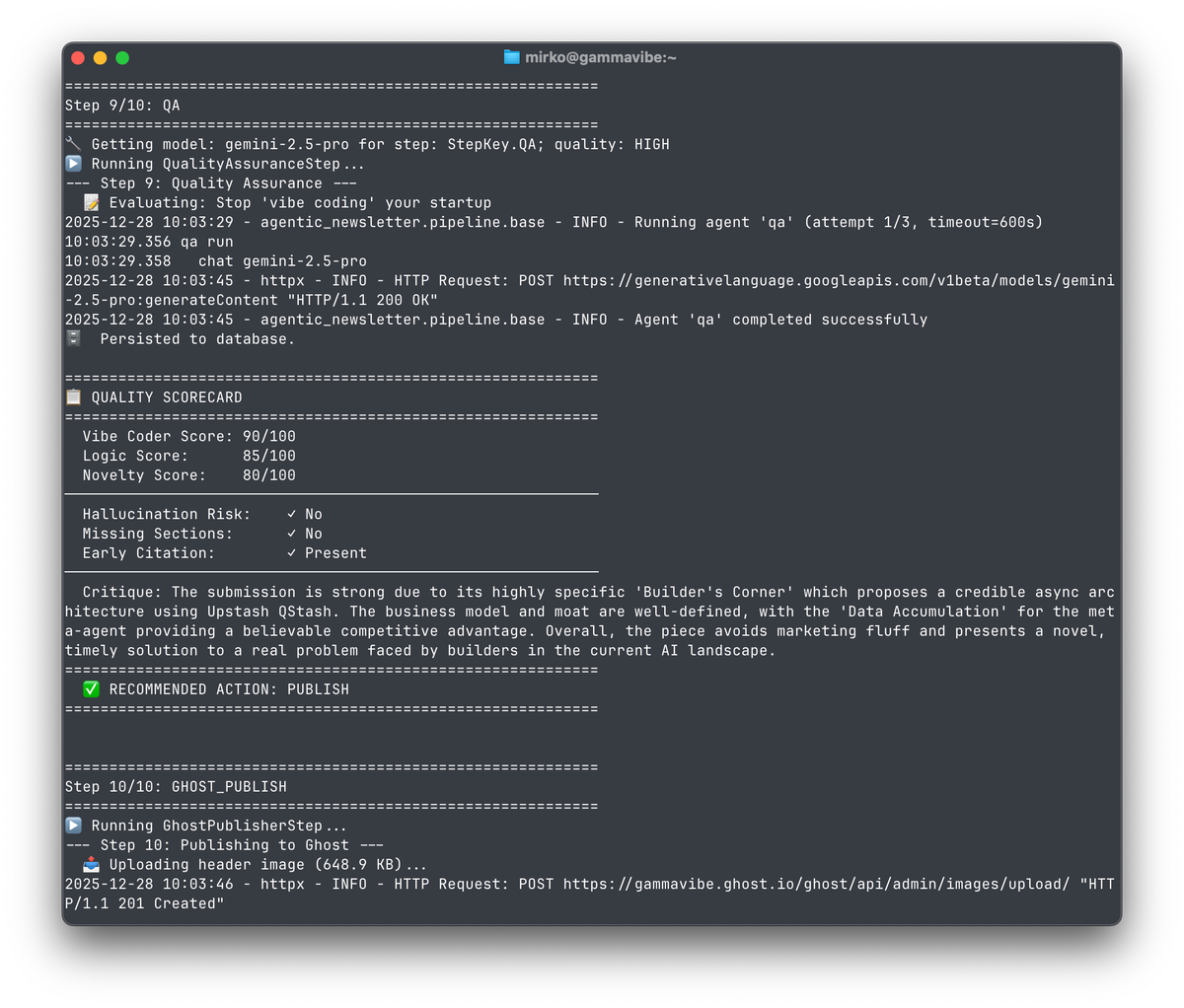
Every morning, my AI pipeline wakes up, ingests hundreds of news articles, identifies business opportunities hiding in the noise, and publishes a newsletter—without any human intervention. Here's how I built it.
What This Project Does
Gamma Vibe is a daily newsletter that synthesizes news into actionable startup opportunities. The challenge: take a firehose of raw news and transform it into curated, high-quality business insights that readers actually want to read.
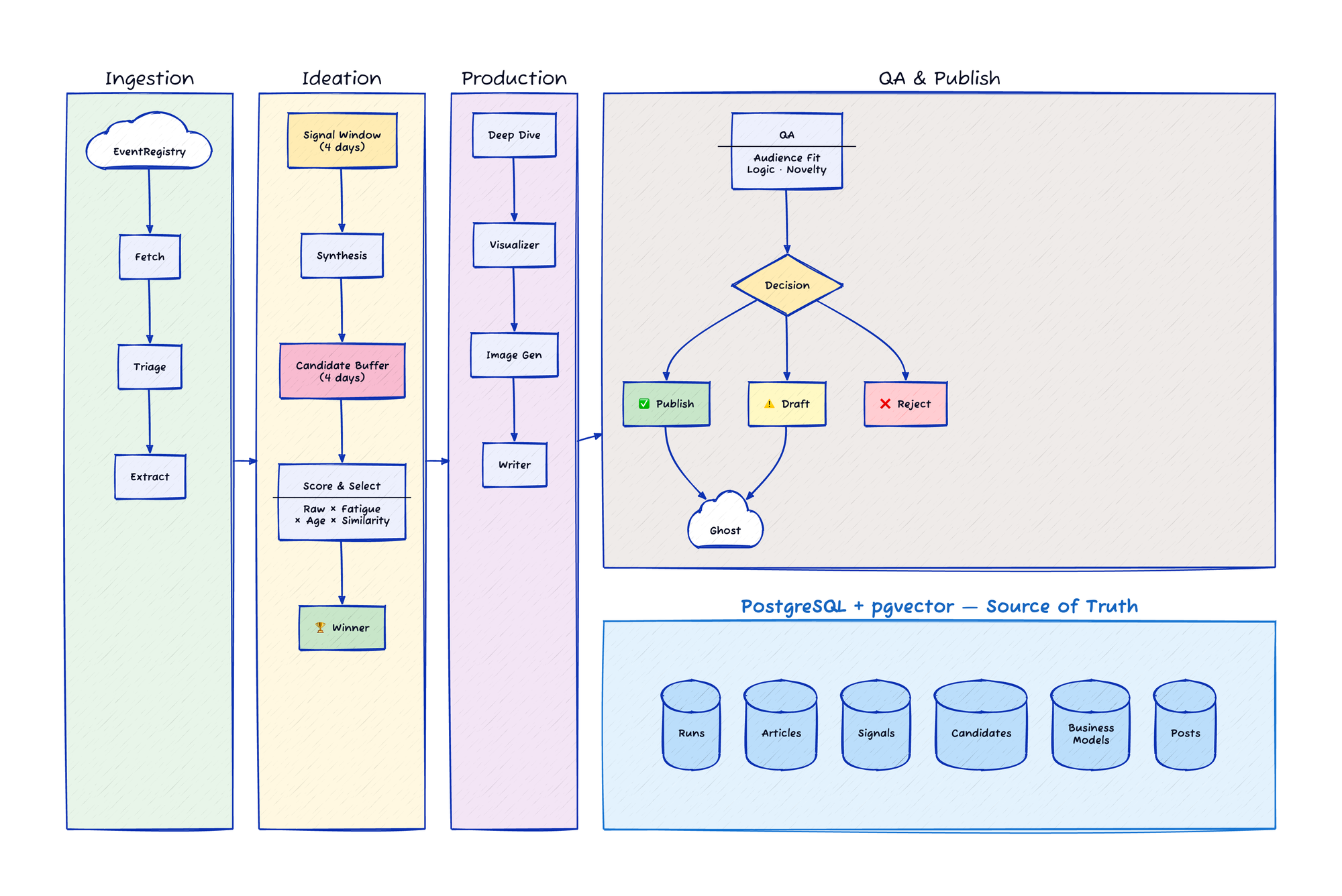
The pipeline handles everything: fetching news, filtering out noise, extracting business signals, synthesizing themes, generating visuals, writing the content, running quality checks, and publishing to Ghost CMS. Ten steps, fully automated, running daily.
You can see an example of the output here: Your AI's Backdoor is Unlocked.
High-Level Architecture
The Evolution from Prototype to Production
I got the initial pipeline working quickly using JSON artifacts. Each step would read from a file, do its work, and write to another file. This was perfect for prototyping—I could focus on the actual pipeline logic rather than persistence plumbing.
But the approach had limitations. The pipeline was completely linear: every run had to fetch all news articles from the previous day, run triage, extraction, and so on—even if I'd just run the pipeline a few minutes earlier. I added a --step parameter to reuse saved artifacts from previous steps while developing new ones, but fundamentally, each run was isolated.
The migration to a database-as-source-of-truth changed everything:
- No redundant processing: Articles are upserted with a unique constraint. Re-running fetch doesn't re-triage articles we've already seen.
- Rolling windows: Instead of just today's signals, synthesis can look at a 4-day window of extracted insights, enabling better trend detection.
- Resumable execution: Each step queries the database for pending work. If the pipeline fails at step 7, resuming picks up exactly where it left off.
- Better candidate selection: Instead of "best idea from today's run," we can consider all pending candidates from the past few days.
State-Based Pipeline Design
Each of the ten steps follows the same pattern:
- Query the database for items needing processing
- Do the work (usually involving an LLM call)
- Persist results back to the database
No data passes between steps via function arguments. The database is the single source of truth. This makes the system remarkably robust—any step can be re-run independently, and partial failures don't corrupt state.
The Ten Pipeline Steps
1. Fetch & Clean: Pull fresh news from EventRegistry API, filter out advertorial content using heuristics, upsert to database (duplicates ignored via unique constraint).
2. Triage: Fast AI filter on new articles. Keep articles about new technology, consumer trends, regulations, emerging problems. Discard stock updates, earnings reports, politics, celebrity news. Batch processing (40 articles at a time), only looking at the first 300 characters of each article, and going with a cheap and fast model keeps costs low.
3. Extraction: For kept articles, extract structured business signals (consumer shifts, pain points, technology opportunities) and market facts (hard statistics for market sizing). Smaller batches (10 articles) with a slightly more capable model.
4. Synthesis: Combine insights from the last 4 days into distinct investment themes. The pipeline generates three candidate archetypes: Meta-Trend (big shifts; AI, etc.), Friction Point (boring but painful problems), and Rabbit Hole (deep niche topics). This and subsequent steps use Gemini 2.5 Pro for higher reasoning capability. Each candidate also gets a vector embedding for later similarity comparison.
5. Deep Dive: Select the winning candidate (more on this selection algorithm below) and expand it into a full business model with value proposition, revenue streams, go-to-market strategy, tech stack, and brand name options.
6. Visualizer: Generate an image prompt based on the candidate's archetype, with different visual styles to prevent sameness.
7. Image Generator: Create the actual header image from the prompt.
8. Writer: Produce the final newsletter in Markdown, following a specific structure and weaving in source article URLs naturally.
9. Quality Assurance: A "cynical editor" persona scores the content on audience fit, business logic, and novelty. Threshold guards auto-reject or flag posts for review if appropriate.
10. Ghost Publisher: Push to Ghost CMS. Rejected posts are skipped entirely. Posts needing review go to draft status. Approved posts publish directly.
Tech Stack
Python 3.13 + uv: Modern dependency management. uv sync and uv run make environment management painless across multiple computers and operating systems.
Pydantic AI: Structured LLM outputs with type safety. The framework handles prompt construction and response parsing, guaranteeing valid schemas when the model responds. I'll go deeper on this in the Gemini section.
PostgreSQL + pgvector: The vector extension enables similarity search for deduplication. When evaluating candidates, I can check if an idea is too similar to something we published in the last 60 days.
SQLModel: Single model definitions that work for both database tables and Pydantic validation. I use a base/table inheritance pattern where the base class contains business logic and the table class adds persistence concerns. It works, though the pattern ends up being slightly awkward in practice.
SQLAdmin + FastAPI: An internal dashboard for inspecting pipeline runs, viewing artifacts, and debugging issues. Read-only (so far), but invaluable for understanding what's happening.
Alembic: Database migrations. Schema changes are versioned and applied consistently across environments.
Docker: Containerized deployment. Different service configurations per environment (dev vs. staging vs. production) without changing application code.
Working with Gemini Models
Model Selection by Task
Not every step needs the most capable model:
- Gemini 2.5 Flash-Lite for triage: High volume, simple keep/discard decisions. Cheap and fast.
- Gemini 2.5 Flash for extraction: More nuanced signal identification, but still processing many articles.
- Gemini 2.5 Pro for synthesis, deep dive, writing, and QA: These steps require reasoning and creativity. Quality matters more than cost here.
I added a --quality parameter to force lower-tier models during development, but there's a floor—certain steps simply don't work well without Pro.
I will likely upgrade to Gemini 3.0 eventually, but for now Gemini 2.5 has the most stable performance and rate limits.
I also use two special purpose models: Gemini 3.0 Pro Image (aka Nano Banana Pro) for image generation and gemini-embedding-001 for vector embeddings.
Pydantic AI for Structured Output
Most pipeline steps use Pydantic AI, which wraps the model calls and handles response parsing. Define a Pydantic model for your expected output, and the framework ensures you get valid, typed data back.
class TriageDecision(BaseModel):
    article_id: UUID
    keep: bool
    reasoning: str
The agent returns exactly this structure, or the call fails. No parsing JSON from free-form text, no hoping the model followed instructions.
Direct SDK Calls
Pydantic AI doesn't yet support embeddings or image generation, so I use the Google GenAI SDK directly for those. As Pydantic AI matures, I'll migrate these calls over—having everything go through one abstraction layer would make it easier to swap providers (Gemini to OpenAI to Grok) if needed.
Update 2025-12-29: It looks like Pydantic AI v1.39.0 added support for embeddings, and other recent version updates improved image generation support. So I might be able to drop the direct Gemini API dependencies soon.
Observability with Pydantic Logfire
Pydantic AI integrates with Logfire for observability. Every agent call is logged with inputs, outputs, token usage, and latency. This was an unexpected bonus—I didn't know about Logfire before starting, and it's been invaluable for debugging agent behavior without resorting to print statements everywhere. The generous free tier makes it a no-brainer.
Solving the "Sameness" Problem
Left to its own devices, an AI pipeline will produce repetitive output, especially given dominant and persistent trends in the news. Same kinds of ideas, same visual style, same names, same phrasing. I had to build explicit mechanisms to ensure variety.
Candidate Selection: Best of Buffer
The naive approach would be: run synthesis, pick the highest-scoring candidate, expand it. But this leads to repetitive archetypes—if Meta-Trend ideas consistently score higher, you get Meta-Trend (AI, AI, AI...) every day.
Instead, I use a "Best of Buffer" strategy:
- Candidate Pool: Consider all pending (unpublished) candidates from the last 4 days, not just today's run.
- Fatigue Multiplier: Penalize candidates with the same archetype as recent winners:
- Same as previous winner: 0.6x
- Same as 2nd previous: 0.8x
- Same as 3rd previous: 0.9x
- Age Decay: Slight penalty for older candidates (older ideas lose 5-10% of their score) to favor freshness while still allowing high-quality older ideas to win.
- Similarity Veto: Using vector embeddings, check each candidate against published ideas from the last 60 days. If cosine similarity exceeds 0.85, the candidate is vetoed entirely. Between 0.6-0.85, there's a linear penalty.
The result: varied archetypes, no repetition of ideas, and consistently high quality.
Signal Aggregation
Synthesis doesn't just look at yesterday's news. It uses a 4-day rolling window of extracted signals, enabling better pattern recognition. A trend mentioned across multiple articles over several days is more significant than a single mention.
Visual Variety
Each candidate archetype maps to a different visual style:
- Meta-Trend: Dark Glassmorphism (frosted glass, bokeh effects, void black background)
- Friction Point: Industrial Cyber-Structure (glowing lines, constructivist aesthetic, navy blue)
- Rabbit Hole: Randomly chosen between Soft 3D Claymorphism or Abstract Paper Cutout
This prevents the "generic AI art" look where every image has the same dark gradient background. While I'll likely keep tuning the specific styles, the principle seems to be working well.
Content Grounding
To prevent hallucinations, every business signal must trace back to source articles. The extraction step captures article IDs alongside each insight, and the writer is instructed to weave these citations naturally into the narrative—not as footnotes, but as part of the story.
The QA step also watches for this. The "cynical editor" persona flags claims that seem ungrounded or posts without citations in the first three sections (the free preview).
Why Ghost CMS?
I evaluated several options for the publishing layer. Ghost won for several reasons:
Open source with great Docker support: For local development and staging, I can run a full Ghost instance with docker compose up. No need for a production account during development, and a convenient sandbox for exploring Ghost settings and themes.
Excellent Admin API: Programmatic publishing with full control over post content, status, scheduling, and metadata. The API is well-documented and does what you'd expect.
Strong email delivery: Ghost integrates with Mailgun for reliable email sending. For a newsletter, this is arguably the most important feature—your content is worthless if it doesn't reach inboxes.
Easy paid-member content: Adding a paywall divider to each post is trivial. Free members see the first three sections with an upsell prompt; paid members see everything. No complex access control logic needed.
Built-in subscription management: Stripe integration, member management, subscription tiers—all handled by Ghost. I didn't have to build any of this, allowing me to focus purely on the Agent logic.
Great reading experience: Ghost's themes are optimized for readability across desktop, mobile, and email. The content looks good everywhere without custom styling.
Reasonable pricing: Ghost Pro starts cheap, though I needed the $35/month tier to access the Admin API and paid subscriptions. The lower tiers don't support those features.
Why EventRegistry?
There are a number of news services that offer APIs. I landed on EventRegistry (aka newsapi.ai) for the following reasons:
Generous free tier: Unlike many competing services that either add a delay (often 1 day) or omit article bodies in the free tier, the free tier is generous (full article bodies, no delay), making it perfect for MVP validation before scaling to the paid tier.
Clean and well-documented API and Python SDK: The REST API returns all the fields I need (including the full article bodies) and comes with excellent docs. In addition, they offer a convenient Python library that makes the integration even easier.
Topic Pages: EventRegistry allows users to define so-called Topic Pages that consist of a weighted list of categories and news sources and several other search parameters. That way, I can easily tune the selection and weighting of different sources online, without having to hardcode any of this into the pipeline.
That said, the overall pipeline is mostly agnostic of the news service, and I could swap this out fairly easily if I had to.
Deployment Architecture
Development: Run Python locally with uv run, Docker for backing services (Postgres, Ghost, MailDev for email capture). Fast iteration, full observability.
Staging: A Raspberry Pi in my house running the full Docker stack. It's energy-efficient, always on, and I already had one. Docker made it easy to replicate something close to production.
Production: DigitalOcean droplet plus their managed Postgres service. The pipeline runs daily via cron.
Docker made it easy to spin up different service configurations per environment—local dev doesn't need Caddy for HTTPS, production doesn't need Postgres (since I use DigitalOcean's managed Postgres service), etc.
Cost Breakdown
People always ask about costs for AI projects. Here's the breakdown:
| Service | Monthly Cost |
|---|---|
| EventRegistry (News API) | Free tier now, $90 later |
| Ghost Pro | $35 |
| DigitalOcean (droplet + managed Postgres) | $22 |
| Gemini API | ~$20 (< $1/day) |
Total: $77/month now, $167/month later (with EventRegistry paid tier).
The interesting insight: AI is the least expensive part. This was deliberate. I built a scalable business model where content is generated once and consumed by many subscribers, rather than incurring per-user generation costs. The unit economics improve with scale.
Gemini costs will likely increase as I evolve the pipeline—I have features in mind that require more inference—but it's unlikely to become the dominant cost driver.
Lessons Learned
JSON Artifacts → Database State
The artifact-based approach was ideal for prototyping. It let me focus on pipeline logic without building persistence infrastructure. But I should have migrated to database-as-source-of-truth sooner. Trying to maintain both systems in parallel—artifacts for debugging, database for production—created unnecessary complexity and held me back from implementing the "best of buffer" strategy.
If I were starting over: prototype with artifacts until the pipeline works end-to-end, then immediately migrate to database. Don't try to keep both.
Invest in Observability Early
Logfire turned out to be essential for understanding agent behavior. When an LLM produces unexpected output, you need to see what went in and what came out. Adding observability after the fact is painful; building it in from the start is nearly free with the right tools.
LLM Testing Philosophy
Don't mock LLM calls in tests. The "magic" is in the model—mocking it means you're just testing that mocks return what you told them to return. Instead, test the deterministic parts (parsing, validation, business logic) and use observability for the LLM behavior.
Cost Optimization Requires Intentionality and Tuning
Model selection matters. A --quality parameter that forces lower-tier models in development saves real money and speeds up iteration. But there's a floor—some steps simply require the most capable model to produce usable output.
For example, I saved a lot of money by moving the extraction step (which runs on every news article that passes triage!) to Gemini 2.5 Flash, but discovered that it would occasionally get bored and truncate UUIDs in the JSON output. I had to implement a mapping layer (integers <-> UUIDs) to work around this. Flash is fast and cheap, but needs stricter guardrails than Pro.
Another example was the "Stuttering" model issue: In dev, I tried using Gemini Flash for the writing step to save cost. While it worked fine most of the time, I found it would sometimes emit a truncated JSON object, immediately followed by a correct one in the same generation pass. Pydantic AI would grab the first (broken) one and run with it. I learned that for long-context creative generation (Markdown > 1k words), the 'reasoning' density of Pro models is worth the extra penny to prevent these stability issues.
AI Coding Tools
I experimented with several AI coding assistants during this project: GitHub Copilot (which I'd used for over a year), Antigravity, and Claude Code.
Claude Code with Opus 4.5 was by far the most powerful and reliable. I was skeptical of the subscription cost at first, but it's proven worth it. The model understands complex codebases and produces code that actually works.
Gemini 3 Pro was invaluable for everything outside of coding: brainstorming, design discussions, marketing copy, Ghost configuration, deployment strategy. Different tools for different jobs.
Framework Choice
I considered LangChain and similar frameworks but chose Pydantic AI. The agent functionality itself is a small part of the application—most of the complexity is in the pipeline orchestration, data modeling, and deployment. Pydantic AI's focus on validation and structured output fit my needs, and the framework clearly learned from earlier attempts in this space. Logfire integration was an unexpected bonus.
What's Next
For now, I'm focused on monitoring pipeline quality and ensuring output variety. There are smaller fixes and improvements to make based on analyzing the generated content.
I have some exciting ideas for where this could go, but I'm keeping those close for now.
One direction I'm considering: leveraging the data the pipeline generates in additional ways. A searchable database of AI-generated startup ideas could be valuable, if there's enough interest. The infrastructure to support this already exists—it's just a question of whether users would pay for it.
Try It Out
- Read the sample issue (unlocked for everyone)
- GammaVibe Newsletter (all startup ideas so far)
- GammaVibe Labs (the R&D studio)
Video Version
Feel free to check out this video version of the architecture breakdown as well: